
5 Best Monitor for a 1070 for 1440p Gaming
For most buyers, the Acer KB242Y G0bi 23.8-Inch IPS Monitor is the best monitor for a 1070 because its 23.8-inch IPS panel provides a clear picture at a desk-friendly size. It offers a sensible match for a GeForce GTX 1070 without pushing you toward an oversized display or expensive high-end hardware.
This guide is for PC gamers and everyday users who want a capable screen for 1080p play, browsing, and work. The key factors are panel size, resolution, refresh rate, response time, and adaptive-sync support. A monitor should also fit your desk and connect easily to your computer. The 5 picks below are ranked by their strengths, with clear reasons to consider each one and honest drawbacks that may affect your choice.
Quick Comparison
| # | Product | Best For | Price | |
|---|---|---|---|---|
| 1 | Acer KB242Y G0bi 23.8-Inch IPS Monitor | Budget home office workers | $79.99 | View → |
| 2 | ASUS VA249QG 24-Inch Monitor | Dual-monitor office setups | $109.99 | View → |
| 3 | Acer Nitro VG270K L1 27-Inch Gaming Monitor | Entry-level PC gamers | $159.99 | View → |
| 4 | Amazon Basics 24-Inch Full HD IPS Monitor | Students needing affordable display | $96.09 | View → |
| 5 | Acer KA242Y G0bi 23.8-Inch IPS Monitor | Compact desk workstation users | $79.99 | View → |
5 Top Monitors for a GTX 1070
These picks are ranked by resolution, refresh rate, and value, counting down to the top monitor for a GTX 1070.
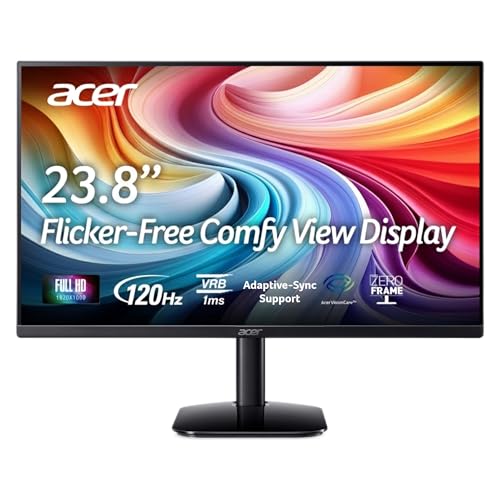
5. Acer KA242Y G0bi 23.8-Inch IPS Monitor
Best for: Budget home-office and casual gaming
The Acer KA242Y G0bi is a 23.8-inch IPS monitor with a 1920×1080 resolution and 16:9 aspect ratio. Its 120Hz refresh rate can make scrolling, video, and supported games look smoother than a standard 60Hz screen. Adaptive-Sync support helps reduce tearing with compatible graphics hardware. Acer rates the display at 250 nits and 99% sRGB coverage, while the 1ms VRB setting targets clearer motion.
At $79.99, this monitor covers the basics at a low price. It includes one HDMI 1.4 port, one VGA port, and an HDMI cable, which suits a current computer plus an older device. The stand tilts from -5° to 25°, and the 100x100mm VESA pattern allows wall or arm mounting. Its slim-bezel design also works well in a two-screen setup. Still, Full HD is modest for a 23.8-inch display, and the 250-nit brightness may look limited in a sunny room.
Pros
- 120Hz refresh rate provides smoother motion than typical 60Hz office monitors.
- IPS panel and 99% sRGB coverage support consistent color and viewing angles.
- HDMI, VGA, included cable, and VESA mounting add useful setup flexibility.
Cons
- Only one HDMI port limits connections for multiple modern devices.
- The 1ms response figure uses VRB, and Full HD offers less workspace than higher-resolution screens.
4. Amazon Basics 24-Inch Full HD IPS Monitor

Best for: Home offices and everyday computer work
This 24-inch monitor uses a 1920×1080 IPS panel for office tasks, video calls, webinars, streaming, and general entertainment. IPS technology helps keep colors and contrast consistent when viewed from different angles. Its 75 Hz refresh rate is a small step above standard 60 Hz screens, though it is not aimed at high-refresh gaming.
The connection panel includes one HDMI 1.4 port, one DisplayPort, one VGA input, and 3.5 mm audio connections. An adjustable stand provides tilt from -5 to 23 degrees, while the 100x100mm VESA pattern supports wall mounting. The package includes the stand, power cord, HDMI cable, and manual. Built-in speakers add convenience for meetings and videos, but this monitor costs $96.09, so buyers should keep expectations modest for sound quality.
Pros
- IPS panel supports more consistent color from wide viewing angles.
- HDMI, DisplayPort, and VGA inputs work with newer and older computers.
- Included stand, HDMI cable, and 100x100mm VESA support simplify setup options.
Cons
- The stand only tilts, with no height, swivel, or pivot adjustment.
- Full HD resolution provides less desktop space and sharpness than a 1440p monitor.
3. Acer Nitro VG270K L1 27-Inch Gaming Monitor

Best for: 4K gaming on a budget
The Acer Nitro VG270K L1 is a 27-inch IPS gaming monitor with a 3840 × 2160 UHD resolution and 16:9 aspect ratio. Its 0.155mm pixel pitch supports crisp text and detailed game environments. The near-bezel-less frame also suits dual-monitor setups. At $159.99, it offers strong resolution for the price.
Its main trade-off is the refresh-rate split. The screen reaches 72Hz at 4K, or 144Hz at 1920 × 1080 through Dynamic Frame Rate technology. AMD FreeSync can reduce tearing when the graphics card and display output stay within a compatible range. The monitor also supports HDR10 and claims 95% DCI-P3 color coverage, while its response time is rated at 1ms GTG, with up to 0.5ms GTG under certain settings. A DisplayPort 1.4 connection and two HDMI 2.0 ports provide useful flexibility, and an HDMI cable is included.
Pros
- 4K resolution on a 27-inch IPS panel delivers sharp images and fine text.
- DFR provides a choice between 72Hz at 4K and 144Hz at 1080p.
- HDR10 support, 95% DCI-P3 coverage, and FreeSync improve color and motion handling.
Cons
- The fastest 144Hz mode drops resolution to 1920 × 1080, so it is not 4K high-refresh gaming.
- The stand only tilts from -5° to 25°, with no listed height, swivel, or pivot adjustment.
2. ASUS VA249QG 24-Inch Monitor

Best for: Budget-conscious home office gamers
The ASUS VA249QG is a 24-inch Full HD monitor for work, study, streaming, and casual gaming. Its IPS panel displays 1,920 by 1,080 pixels with 178-degree viewing angles, so the picture remains consistent when you sit off-center. The 99% sRGB coverage should suit general photo work and everyday media, while the slim, frameless design fits neatly into a dual-monitor desk.
A 120Hz refresh rate makes scrolling and motion look smoother than on a standard 60Hz screen. The 1ms MPRT mode and Adaptive-Sync can help reduce visible blur, tearing, and stutter, though results depend on the connected device and game. ASUS includes HDMI, DisplayPort, and VGA, giving this display useful flexibility for newer laptops, desktops, consoles, and older computers. Flicker-Free and Low Blue Light settings support longer viewing sessions. Built-in speakers, VESA mounting, a three-year warranty with advanced replacement, and a free one-month Adobe Creative Cloud subscription add value at $109.99. The software offer runs through August 31, 2028.
Pros
- 120Hz refresh rate improves scrolling, video, and casual gaming motion.
- HDMI, DisplayPort, and VGA support both current and legacy devices.
- VESA mounting and integrated speakers help create a cleaner desk setup.
Cons
- Full HD resolution is less spacious and sharp than 1440p for detailed work.
- The 24-inch screen may feel small for split-screen multitasking or immersive gaming.
1. Acer KB242Y G0bi 23.8-Inch IPS Monitor

Best for: Budget home-office and casual gaming
The Acer KB242Y G0bi is a 23.8-inch IPS monitor with a 1920 x 1080 Full HD resolution and 16:9 widescreen layout. Its 120Hz refresh rate can make scrolling, video playback, and supported games look smoother than a standard 60Hz display. At $79.99, it targets buyers who need an affordable everyday screen rather than a high-resolution creative monitor.
The zero-frame design keeps the visible border narrow, which gives the display a cleaner look and works well in dual-monitor setups. Adaptive-Sync support, including FreeSync compatibility, can reduce tearing when the monitor and compatible graphics card work together. Acer lists 1ms VRB response time, though that figure uses a specific motion-response mode rather than representing every viewing condition. Brightness reaches 250 nits, and the 0.275mm pixel pitch suits normal desk viewing. The IPS panel should provide more consistent viewing angles than a basic TN screen, but the listed Full HD resolution remains modest for a 23.8-inch display.
Pros
- 120Hz refresh rate improves motion clarity for gaming, scrolling, and video.
- IPS panel offers consistent image quality across wider viewing angles.
- Adaptive-Sync and FreeSync compatibility can limit visible screen tearing.
Cons
- 250-nit brightness may look limited in sunny rooms or near windows.
- Full HD resolution provides less workspace and sharpness than a 1440p monitor.
Buying Guide
The most important factor is matching resolution and refresh rate to the GTX 1070’s gaming output. A 1080p display at 144Hz usually fits this graphics card better than a 4K model that may require lower settings and frame rates.
- Resolution and size: Choose 24 to 27 inches at 1080p for high frame rates, or 27 inches at 1440p if you prefer sharper images over maximum speed.
- Refresh rate: Look for 120Hz to 165Hz for competitive games. A 240Hz screen usually offers little benefit because many games will not reach those frame rates.
- Variable refresh rate: Select FreeSync or G-Sync Compatible support, with a useful range such as 48Hz to 144Hz. This reduces tearing when performance moves between 60 and 100 frames per second.
- Panel type: An IPS panel provides better color and viewing angles. VA can offer deeper blacks, while TN models often cost less but look less impressive.
- Connections and price: Require DisplayPort for high-refresh PC gaming, plus HDMI for other devices. A sensible budget is $150 to $300, depending on resolution, size, and features.
If you cannot have everything, prioritize the resolution and refresh-rate combination that matches the games you play most.
Frequently Asked Questions
How many Hz should a monitor have for a GTX 1070?
A 1080p monitor with a 144Hz refresh rate is the best match for most GTX 1070 gaming systems. This resolution keeps frame rates manageable while 144Hz makes shooters and racing games look smoother. A 24-inch or 27-inch IPS display, with DisplayPort input, offers a practical balance of sharpness, speed, and color.
What resolution works best with a GTX 1070?
A 1440p monitor can work with a GTX 1070, but 1080p is usually the better choice for high-refresh gaming. At 1440p, newer AAA games may require reduced settings to stay near 60 frames per second. Choose 1440p for sharper text and single-player games, not maximum competitive performance.
Can a FreeSync monitor work with a GTX 1070?
Yes, a FreeSync monitor can pair with a GTX 1070, especially when it supports adaptive sync through DisplayPort. Nvidia enabled broader G-Sync Compatible support on many cards, but compatibility varies by monitor and driver. Look for a display with a 48-144Hz variable-refresh range and confirm the connection standard before buying.
Are curved screens good for a GTX 1070?
Curved screens are not necessary for a GTX 1070, so a flat 24-inch or 27-inch panel is usually the safer value. Curved models can feel more immersive at 32 inches or ultrawide sizes, but they often cost more and use extra desk depth. Prioritize resolution, refresh rate, response time, and ports first.
Conclusion
Acer KB242Y G0bi 23.8-Inch IPS Monitor is the top pick for GTX 1070 owners who want an affordable, everyday display for gaming, school, and general desktop work. If smoother competitive play matters more than keeping costs low, pick a 144Hz gaming monitor with adaptive sync and a resolution your graphics card can drive comfortably. Before buying, double-check the screen size, connection compatibility, number of monitors included, and current price, since listings and bundles can change. A 23.8-inch 1080p panel remains a sensible match for this older graphics card. It keeps the workload manageable while delivering a sharp image at normal desk distance. Choose useful features, not extras that raise the bill.
