
6 Best Gaming Desk Lights for Small Desks
The RGB Music-Sync LED Light Bar is the top pick for most buyers seeking the best gaming desk lights. Its main advantage is music-sync mode, which turns audio into changing light patterns while adding colorful ambient light. It suits gaming setups that need visual energy without filling the desk with several separate fixtures.
This guide is for PC gamers, streamers, and anyone building a more atmospheric workspace. Focus on the light bar’s size, brightness, control method, and placement options. A compact design matters on crowded desks, while adjustable colors and reliable controls make daily use easier. The six picks below are ranked with clear reasons and honest drawbacks for each, so you can match the lighting style to your setup and budget.
Quick Comparison
| # | Product | Best For | Price | |
|---|---|---|---|---|
| 1 | RGB Music-Sync LED Light Bar | Music-Driven Gaming Setups | $15.99 | View → |
| 2 | Govee Smart Light Bar | App-Controlled Living Rooms | $39.99 | View → |
| 3 | Samphon Monitor Light Bar Desk Lamp | Glare-Free Monitor Desks | $13.99 | View → |
| 4 | TJOY Smart Light Bar, RGB Desk Light | Colorful Bedroom Ambiance | $20.99 | View → |
| 5 | Ledagic IC+RGBW LED Light Bar | Bright White Task Lighting | $9.99 | View → |
| 6 | TJOY Smart Wi-Fi Light Bar | Wi-Fi Connected Home Offices | $23.99 | View → |
6 Gaming Desk Lights Worth Considering
The list is ranked by lighting flexibility, desk fit, and useful features, counting down to the top pick.
6. TJOY Smart Wi-Fi Light Bar
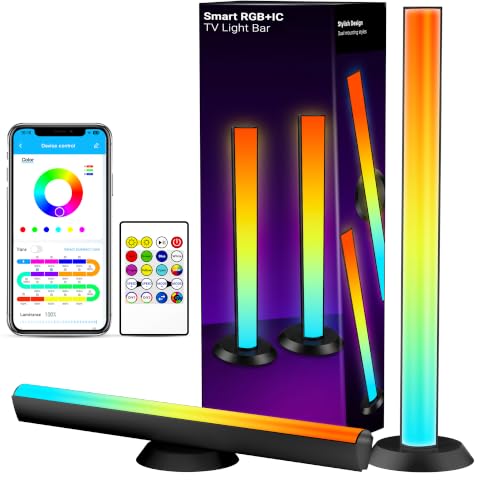
Best for: Budget gaming and desk mood lighting
The TJOY Smart Wi-Fi Light Bar includes two RGB+IC bars linked by a 6-foot cable. One controller operates both units, so they cannot work separately. You can lay them flat, stand them vertically, or rotate them up to 90 degrees. Included brackets also allow mounting behind a monitor or TV. The plastic construction keeps the $23.99 price low, but these lights are designed for atmosphere, not full-room illumination.
The system supports 2.4GHz Wi-Fi and Bluetooth, with control through the app, remote, USB-cable button, Alexa, or Google Assistant. The app includes timers, preset scenes, custom colors, and music synchronization. A built-in microphone responds to music, television audio, or game sound. RGB+IC lighting provides more than 16 million color options, giving desks and screens a range of effects for gaming, streaming, or casual viewing. A one-year warranty and stated 24-hour service response add useful purchase support.
Pros
- Four control options cover app, remote, voice assistants, and the USB-cable button.
- Music sync, timers, custom colors, and scene presets add flexible daily use.
- Rotating stands and included brackets support desk, cabinet, monitor, and TV placement.
Cons
- The two bars remain connected by the 6-foot cable and cannot operate independently.
- Plastic housings and limited brightness make them unsuitable as a main room light.
5. Ledagic IC+RGBW LED Light Bar

Best for: Budget gaming and TV setups
The Ledagic IC+RGBW kit includes two USB-powered LED light bars for a TV stand, desk, game console, or display shelf. Each bar uses a 60-inch cable, so you can power them from a TV, monitor, laptop, USB charger, or power bank. The included remote has 24 buttons, while the LotusLamp X app handles color, brightness, scenes, timers, and lighting modes.
Its strongest feature is flexibility for the $9.99 listed price. You can choose from more than 64 patterns, including chasing, strobe, gradient, and running effects. A built-in music sensor changes the lights with nearby audio from games, films, or music. The IC+RGB mode offers color effects across 16 million colors, while the separate white mode provides brighter task lighting. Brightness adjusts from 1% to full power, and timers can turn the bars on or off at set times. A button on the USB lead provides basic control without the app or remote.
Pros
- Two light bars add color around TVs, desks, and cabinets.
- USB power works with many common devices and power banks.
- App, remote, music syncing, timers, and 64+ patterns offer broad control.
Cons
- The 60-inch cables may limit placement around larger TVs or desks.
- The white and IC+RGB modes switch between functions rather than providing full-color and white light at the same time.
4. TJOY Smart Light Bar, RGB Desk Light

Best for: Desktop mood lighting and gaming setups
The TJOY Smart Light Bar pairs two plastic RGB+IC light bars for a desk, monitor, or TV. A 6-foot connecting cable links both units, so one USB-cable controller runs the pair. They cannot work separately. At $20.99, this is an affordable way to add colored backlighting without buying separate lamps.
The bars produce more than 16 million color combinations and include preset scenes, custom colors, timers, and music-reactive effects. A built-in microphone responds to nearby music, TV audio, PC sound, or game audio. You can control the setup through the Bluetooth app, included remote, or buttons on the USB cable. Each bar rotates up to 90 degrees, can lie flat or stand upright, and can mount behind a screen with the included brackets. The 60-lumen output creates atmosphere, not room lighting. The app does not support Alexa, Google Assistant, or Smart Life.
Pros
- Three control options make quick adjustments easy, while the app adds timers and custom colors.
- Music mode reacts to audio through the built-in microphone for more active gaming or party lighting.
- Flexible placement includes flat, vertical, rotated, and bracket-mounted positions.
Cons
- The two bars remain connected by one 6-foot cable and cannot be used as separate lights.
- Plastic construction and 60 lumens limit this product to mood lighting. It will not brighten a whole room.
3. Samphon Monitor Light Bar Desk Lamp

Best for: Compact monitor-based workstations
The Samphon Monitor Light Bar is an 11.8-inch USB-powered lamp for desks, monitors, and gaming setups. It projects light downward at a 45-degree angle, aiming to brighten the keyboard and work area without shining directly into your eyes or screen. Samphon rates it for up to 800 lux at the center, with coverage of about 30 by 20 inches. That makes it better suited to focused desktop lighting than illuminating an entire room.
You get three color temperatures: 3000K warm, 4000K neutral, and 6500K cool. Brightness adjusts continuously, and the memory feature recalls your last setting after switching the lamp off. A single mechanical button controls power, color temperature, and dimming. It connects through USB, so you can use a computer, USB adapter, or power bank. The counterweight clip is designed for thin, thick, regular, and curved monitors, while keeping the lamp off your desk. At $13.99, its main appeal is practical lighting in a small package.
Pros
- 11.8-inch bar provides wide desktop coverage without using desk space.
- Three color temperatures and continuous dimming suit work, reading, and gaming.
- USB power works with computers, adapters, and portable power banks.
Cons
- It needs a separate USB power source and has no built-in battery.
- One side-mounted button handles every control, which may feel less convenient than a remote or touch panel.
2. Govee Smart Light Bar

Best for: Gaming monitors under 45 inches
At $39.99, the Govee Smart Light Bar adds colored backlighting to a gaming desk, TV stand, or living room setup. Its RGBICWW system combines segmented RGB colors with adjustable cool-to-warm white light. That gives you more control than a basic single-color LED strip. It works best with monitors under 45 inches, and the 106-inch cord allows flexible placement. You can lay the bar flat, stand it vertically, or mount it behind a screen with the included brackets.
The built-in microphone reacts to nearby sound, so colors and effects can shift with music, games, or movies. The Govee Home app provides more control, including 60-plus scene modes, segmented brightness settings, schedules, room grouping, and custom effects. Its AI lighting bot can create effects from text, voice, or an image. Matter support also allows voice commands through Alexa and Google Home without a separate hub. Still, some advanced controls depend on using the app.
Pros
- RGBICWW lighting delivers vivid colors and adjustable warm or cool white tones.
- Music sync uses a built-in microphone, with no extra audio connection required.
- Flat, vertical, or mounted placement suits desks, TV stands, and monitor backs.
Cons
- The recommended 45-inch screen limit makes it a poor fit for larger TVs.
- App-based setup and customization may feel excessive for buyers wanting simple static lighting.
1. RGB Music-Sync LED Light Bar

Best for: Budget desktop and gaming setups
This RGB light bar adds color behind a monitor, TV, or desk without needing a separate app. It uses USB power, so it can connect to a PC, game console, monitor, TV, or USB charging plug. The removable base gives you more placement options, while the lightweight design makes repositioning simple. At $15.99, it targets buyers who want ambient lighting without a complicated setup.
The standout feature is its sound response. Three music-sync modes react to nearby audio and change the light pattern with the beat. IC lighting also provides eight dynamic color modes for more movement than a single static color. Control comes from the included remote or a button on the light bar itself. It works without Wi-Fi and is ready to use out of the box. Keep in mind that this product does not produce white light, so it cannot replace a regular desk lamp or monitor light.
Pros
- Three music-sync modes respond to sounds in the surrounding area.
- Eight IC-powered dynamic modes add changing color effects.
- USB power and a removable base support flexible placement.
Cons
- It has no white-light setting, limiting its use for task lighting.
- Remote control adds convenience, but it can be misplaced, leaving the onboard button as the backup control.
Buying Guide
Glare control is the most important factor when choosing a gaming desk lamp. Reflections on your monitor can cause eye fatigue, so look for indirect light, a frosted diffuser, or an adjustable shade that keeps LEDs out of your sightline.
-
Brightness range: Choose at least 500 lumens for desk work, with dimming down to 10% or lower for games played in a dark room.
-
Color temperature: A range near 2700K to 6500K supports warm evening lighting and cooler task light during daytime use.
-
Coverage and size: A 15- to 24-inch light bar or lamp arm can cover a typical 47- to 60-inch desk without leaving bright and dark patches.
-
Placement options: Look for a weighted base, clamp, or monitor-mounted design. A clamp should fit desks about 0.5 to 2.5 inches thick.
-
Controls and power: Physical buttons or a wired remote respond faster than an app. USB-C power is practical, but check that the cable reaches your outlet or PC, usually 4 to 6 feet.
If you cannot have everything, prioritize glare control, because comfortable screen viewing matters more than RGB effects or smart features.
Frequently Asked Questions
How bright should a gaming desk light be?
A gaming desk light should offer adjustable output of roughly 400 to 800 lumens for keyboard work and nearby notes without washing out the screen. Lower the setting at night to reduce harshness. A diffuser can soften bright spots on the desktop, while a flexible arm helps direct light where you need it.
What color temperature is best for gaming desk lighting?
Warm to neutral white light, around 3,000 to 4,000 kelvins, usually works well for gaming because it feels less harsh during long evening sessions. Choose about 5,000 to 6,500K for daytime task work if you prefer a crisp white appearance. Adjustable color temperature gives you more control than one fixed setting.
Can desk lights reduce glare on a gaming monitor?
Desk lights can reduce monitor glare when you place them beside or behind the screen, rather than directly in front of it. Keep the bulb out of your display’s reflection path, and aim the beam toward the desk at roughly 30 to 45 degrees. A matte shade also helps control bright hotspots.
Are RGB lights useful for a gaming setup?
RGB desk lights are useful for ambient color and atmosphere, but they are not a substitute for focused white task lighting. Use RGB behind a monitor or along the rear edge of the desk, then add a neutral lamp for keys and paperwork. Many models offer 8 to 16 million color choices.
Conclusion
RGB Music-Sync LED Light Bar is the top pick for gamers who want colorful desk lighting that reacts to music and adds atmosphere without taking over the setup. If your priority is accurate screen illumination rather than room mood, choose a monitor-mounted light bar instead, since its downward beam can brighten your keyboard and desktop with less glare. Before ordering, double-check the lamp’s dimensions against your available space, confirm compatibility with your monitor, desk, or control software, verify how many lights the package includes, and compare the current price across sellers. Features can vary between listings, and a lower price may reflect a smaller kit, fewer accessories, or a different generation of the same product.
