
6 Best Keyboard for Fire Tv for Easy Streaming
The iPazzPort Mini Bluetooth Keyboard Remote is the best keyboard for fire tv for most buyers because it combines a compact QWERTY keyboard, touchpad, and remote controls in one device. Its small layout can make searches, logins, and app navigation easier than using the standard Fire TV remote alone.
This guide is for Fire TV owners who want faster text entry without keeping a full-size keyboard on the sofa. The key factors are overall size, Bluetooth connection stability, button layout, and battery life, since a handy remote still needs regular charging or battery changes. The six picks below are ranked by their practical strengths, with clear reasons and honest drawbacks for each. You will find compact remotes for casual use, plus larger keyboard options for frequent typing and longer searches.
Quick Comparison
| # | Product | Best For | Price | |
|---|---|---|---|---|
| 1 | iPazzPort Mini Bluetooth Keyboard Remote | Compact streaming stick navigation | $22.55 | View → |
| 2 | Logitech K400 Plus Wireless Touch TV Keyboard | Couch-based smart TV control | $29.99 | View → |
| 3 | Fosmon Mini Keyboard with Touchpad | Budget-friendly media center browsing | $26.96 | View → |
| 4 | Rii Mini Bluetooth Keyboard | Portable Bluetooth device control | $19.99 | View → |
| 5 | iPazzPort Wireless Keyboard for Fire TV | Fire TV voice-free typing | $27.44 | View → |
| 6 | Mini Keyboard and Mouse Combo with Touchpad | Mouse-style cursor navigation needs | $18.99 | View → |
6 Top Keyboards for Fire TV
These six Fire TV keyboard picks are ranked by compatibility, layout, and value, counting down to the top choice.
6. Mini Keyboard and Mouse Combo with Touchpad

Best for: Streaming TV from the couch
This handheld wireless keyboard combines a QWERTY layout, touchpad, scroll wheel, and mouse buttons in one compact controller. It connects through Bluetooth 5.2 or a 2.4G USB receiver, giving you two pairing options for smart TVs, streaming devices, computers, tablets, and Android boxes. Type-C charging powers the built-in rechargeable lithium battery, while auto-sleep mode helps reduce wasted power between uses.
The touchpad supports multi-touch gestures, and dedicated volume and media keys make common TV controls easier to reach. RGB backlighting helps you find the keys in a dark room, which is useful during late-night streaming. Its main advantage is the number of controls packed into a handheld format. You can navigate menus, enter search terms, adjust volume, and scroll without switching between a remote and a separate keyboard. The product listing does not provide its physical dimensions or battery runtime, so buyers should check those details before ordering.
Pros
- Dual Bluetooth 5.2 and 2.4G connectivity supports flexible pairing.
- Multi-touch pad, scroll wheel, mouse buttons, and media keys reduce device switching.
- RGB backlighting improves key visibility in dim rooms.
Cons
- Compact keys may feel cramped for long emails or extended typing.
- The listing does not state battery runtime, so charging frequency is unclear.
5. iPazzPort Wireless Keyboard for Fire TV
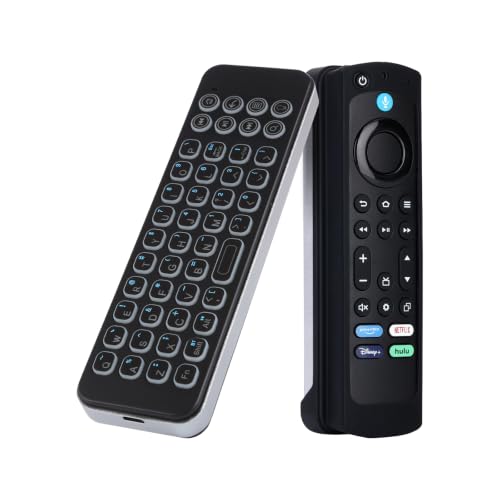
Best for: Frequent Fire TV searchers
The iPazzPort Wireless Keyboard adds a compact typing option to compatible Fire TV devices. It works with Amazon Fire Stick 4K Max, Fire TV Cube, and select Insignia, Toshiba, and Pioneer smart TVs. Bluetooth 5.0 provides a stated wireless range of up to 33 feet, which should cover most living rooms. Its rechargeable battery runs for about 10 days per charge, according to the product information.
The lightweight design suits couch use, especially when entering long searches, passwords, or app names with an on-screen remote. Its keys are designed for quiet typing, so it may fit late-night viewing better than a full-size keyboard. The package also includes a silicone sleeve for a 6.2-inch Fire Stick or Fire TV remote. That sleeve protects the remote, but it does not replace one. At $27.44, the keyboard also includes a one-year warranty and US-based support with free replacement for covered issues. Compatibility remains the main focus, so buyers should confirm their exact TV or streaming device before ordering.
Pros
- Bluetooth 5.0 offers up to 33 feet of stated wireless range.
- Rechargeable battery provides about 10 days between charges.
- Quiet, lightweight design fits couch use and late-night typing.
Cons
- The Fire Stick or Fire TV remote is not included.
- The silicone case only fits compatible 6.2-inch remotes, limiting its usefulness with other remote sizes.
4. Rii Mini Bluetooth Keyboard

Best for: Dark-room streaming and travel
The Rii Mini 2.4G Bluetooth Keyboard combines a compact keyboard, touchpad, and wireless controls in one small device. It connects through Bluetooth to smart TVs, tablets, projectors, Android boxes, Fire TV devices, and other compatible products. For non-Bluetooth equipment, its 2.4GHz connection uses a USB receiver. The keyboard can pair with two devices, which makes switching between a TV and another device more practical.
Its white backlight helps with typing when the room is dark, although the listing does not specify brightness levels or backlight settings. The keyboard measures roughly the size of an iPhone, so it should fit easily in a travel bag or beside a couch. A built-in 500mAh battery can run for more than 30 days per charge, according to the product details, and USB-C charging is more convenient than older charging ports. The advertised wireless range reaches 33 feet. Compatibility covers Windows, Android, Linux, smart TVs, HTPCs, mini PCs, and Steam Deck, but device support can vary. Check your equipment before buying.
Pros
- Dual Bluetooth and 2.4GHz connections support two devices.
- White backlighting helps with late-night TV control.
- USB-C charging and a claimed 30-plus-day battery life reduce charging hassle.
Cons
- The small layout may feel cramped for extended typing.
- Compatibility is not universal, especially with non-Bluetooth devices and smart TVs.
3. Fosmon Mini Keyboard with Touchpad

Best for: Streaming and couch-based TV control
The Fosmon Mini Keyboard combines a compact keyboard, touchpad mouse, and backlighting in one wireless controller. At $26.96, it targets users who want easier text entry on a TV, streaming stick, media computer, or game console. The built-in touchpad removes the need for a separate mouse, while backlit keys can help in a dim living room.
It connects in two ways. The 2.4GHz option uses a nano USB receiver, and Bluetooth 5.2 works with compatible devices without that receiver. Fosmon lists support for Apple TV, Amazon Fire Stick, Google TV, PlayStation 4, PS4 Pro, PS5, HTPC and IPTV systems, VR headset boxes, smartphones, and Windows or Mac computers. The wireless range reaches about 33 feet, or 10 meters, which should cover most seating areas. Compatibility is broad, but Xbox Series consoles are not supported. The mini layout saves space, although it gives your hands less room than a full-size keyboard.
Pros
- Combines keyboard and touchpad control in one handheld unit.
- Offers both Bluetooth 5.2 and 2.4GHz wireless connection options.
- Backlit keys improve visibility when using a TV in low light.
Cons
- Xbox Series consoles are not compatible.
- The mini keyboard layout may feel cramped for lengthy typing sessions.
2. Logitech K400 Plus Wireless Touch TV Keyboard

Best for: Living-room PC and TV control
The Logitech K400 Plus is a black wireless keyboard made for computers connected to a television. It combines a full keyboard with a built-in touchpad, so you do not need a separate mouse on the sofa. A small USB Unifying receiver connects it to the computer, and setup requires no pairing steps. It supports Windows 7, 8, 10 and later, Android 7 or later, and Chrome OS. The listed price is $29.99.
Its strongest feature is simple long-distance control. The wireless connection reaches up to 33 feet, while quiet keys reduce noise during movies or late-night browsing. The touchpad measures 2.99 inches high by 1.85 inches wide, giving you a compact pointer surface for menus and web pages. Logitech rates battery life at up to 18 months, and an on/off switch can help conserve power. The spill-resistant design adds protection from small accidents, but it does not make the keyboard waterproof. Logitech Options Software lets you adjust supported controls and save preferences.
Pros
- Built-in touchpad removes the need for a separate mouse.
- Up to 33 feet of wireless range suits most living rooms.
- Battery life lasts up to 18 months, according to Logitech.
Cons
- It uses a USB receiver, so the computer needs an available USB port.
- There is no backlighting or rechargeable battery, features available on the pricier K830.
1. iPazzPort Mini Bluetooth Keyboard Remote

Best for: Smart TV text entry in dark rooms
The iPazzPort Mini Bluetooth Wireless Keyboard Remote costs $22.55 and combines a compact QWERTY keyboard with a handheld remote setup. It connects through built-in Bluetooth, so you do not need an HDMI extension cable. The keyboard works with Smart TV sticks, Android TV boxes, PCs, and tablets. A silicone sleeve can hold a compatible voice remote, keeping voice search available on one side while the keyboard sits on the other. The original remote is not included.
A backlight turns on or off with the light bulb key, which helps when the room is dark. Added Home, Return, Pause, Search, and Menu buttons make media navigation quicker than using the letter keys alone. The keyboard also locks when it faces down, reducing accidental presses. Its rechargeable lithium-ion battery uses USB charging, so you do not need to replace disposable cells. Bluetooth 3.0 and 4.0 compatibility is the main concern. The listed working distance reaches 10 meters only without obstacles or interference.
Pros
- Compact QWERTY layout makes searches faster than on-screen typing.
- Backlit keys help with navigation in dark rooms.
- Lock function and multimedia buttons reduce accidental input.
Cons
- Bluetooth 5.0 and newer devices may be unstable or incompatible.
- Wi-Fi, microwaves, walls, and low battery can reduce reliability and range.
Buying Guide
Compatibility matters most when choosing a keyboard for Fire TV because some models support Bluetooth typing but not every shortcut, trackpad, or USB connection.
- Fire TV support: Choose a model that lists Fire TV or Fire OS compatibility. Confirm support for your exact device, such as Fire TV Stick 4K, Fire TV Cube, or a built-in Fire TV television.
- Connection type: Bluetooth is usually the simplest option. Look for at least a 30-foot range, while USB models require a compatible port or OTG adapter.
- Built-in controls: A trackpad, volume keys, Home button, and playback controls reduce remote swapping. A trackpad measuring about 2 inches wide gives more room for menu navigation.
- Size and layout: Pick a compact keyboard under 12 inches wide for couch use. Full-size layouts offer easier typing, but they take more space and may lack dedicated streaming buttons.
- Power and lighting: Prefer rechargeable models rated for at least 20 hours per charge, or ones using common AA or AAA batteries. Backlighting helps in dark rooms, but it can shorten battery life.
If you cannot have everything, prioritize confirmed Fire TV compatibility over lighting, size, or extra shortcut keys.
Frequently Asked Questions
How do I choose a keyboard for Fire TV?
Choose a Bluetooth keyboard with Fire TV compatibility, compact keys, and a built-in touchpad if you plan to search often. Check its layout before buying, since some models omit dedicated media controls or use small right-shift and Enter keys. A rechargeable battery rated for at least 30 days can reduce charging interruptions.
What type of keyboard works with Amazon Fire TV?
A Bluetooth keyboard is usually the simplest option for Amazon Fire TV, provided your specific television or streaming device supports Bluetooth accessories. Pair it through Settings, Controllers & Bluetooth Devices, Other Bluetooth Devices, then select the keyboard when it appears. Most compact models use two AAA batteries or a USB rechargeable cell.
Can I use any wireless keyboard with Fire TV?
No, Fire TV does not work with every wireless keyboard, because compatibility depends on the connection type and your Fire TV hardware. Bluetooth models are generally easier to pair, while 2.4 GHz keyboards need a receiver and a usable USB connection. Some televisions hide or limit USB access, and certain shortcut keys may not function.
Are mini keyboards with touchpads good for Fire TV?
Yes, a mini keyboard with a touchpad can be good for Fire TV searches, app login screens, and web pages. Choose one with separated arrow keys and a touchpad around 3 inches wide, since cramped controls make couch use harder. Expect some media buttons to require custom mapping or to do nothing.
Conclusion
For most Fire TV viewers, the iPazzPort Mini Bluetooth Keyboard Remote is the top recommendation, especially for buyers who want a compact controller for searching and basic navigation. If your priority is comfortable, extended typing, pick a full-size wireless keyboard with a touchpad instead, since larger keys feel less cramped during longer sessions. Before buying, double-check the keyboard’s size, Fire TV compatibility, included quantity, and current price, since listings and bundles can change. A small remote keyboard suits couch use, while a larger model fits office setups or frequent searches. Check the return policy when buying an unfamiliar brand. The right choice depends on how often you type and which Fire TV device you own.
