
7 Best Standing Desk for 3 Monitors for Home Use
The Mount-It! Triple Monitor Electric Desk Converter is the best standing desk for 3 monitors for most buyers because its electric lift makes switching between seated and standing work simple. It is a desktop riser built for a three-screen setup, so it can upgrade an existing desk without replacing the whole workstation.
This guide is for remote workers, traders, designers, and anyone who needs three displays without losing a comfortable posture. For a setup like this, check the work surface size first, then confirm the weight capacity for your monitors, stands, keyboard, and accessories. Height range and lift controls also matter, especially if more than one person uses the desk. The 7 picks below are ranked with clear reasons and honest drawbacks for each, so you can compare compact converters with larger electric workstations before choosing one.
Quick Comparison
| # | Product | Best For | Price | |
|---|---|---|---|---|
| 1 | Mount-It! Triple Monitor Electric Desk Converter | Triple-Screen Multitasking Workstations | $482.99 | View → |
| 2 | Rocelco R DADRB-46 Standing Desk Converter | Spacious Sit-Stand Office Setups | $279.99 | View → |
| 3 | VERSADESK PowerPro Electric Standing Desk Converter | Push-Button Height Adjustments | $389.00 | View → |
| 4 | WALI Triple Monitor Stand | Fixed Triple-Monitor Mounting | $82.99 | View → |
| 5 | MOUNTUP Triple Monitor Mount | Flexible Multi-Display Arm Positioning | $89.98 | View → |
| 6 | HUANUO 70×35 3-Stage Electric Standing Desk | Large Desktop Home Offices | $379.99 | View → |
| 7 | AVLT Electric Standing Desk Converter | Compact Electric Desk Conversions | $569.99 | View → |
7 Top Standing Desk Picks
These standing desk picks are ranked from seventh place down to the top choice, based on monitor capacity, stability, and adjustment range.
7. AVLT Electric Standing Desk Converter
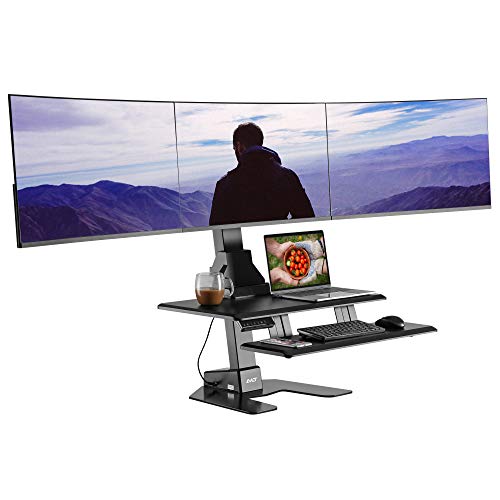
Best for: Triple-monitor home office setups
The AVLT Electric Standing Desk Converter turns a fixed desk into a motorized sit-stand station. Its lift travels from 3.9 to 23.6 inches, letting you change positions without clearing the surface. Three memory presets store favorite heights, and an integrated timer reminds you to stand. The adjustment range suits many desk setups, though comfort still depends on your desk height and body size.
Its strongest feature is triple-monitor support. The frame accommodates three VESA-compatible screens up to 32 inches, while the 28.3 by 15.7-inch upper surface fits a laptop, tablet, keyboard, and smaller office items. A 28.3 by 8.7-inch tray places the keyboard below the displays. The high-density base supports 55 pounds, and built-in cable management keeps cords grouped. At $569.99, it targets demanding multi-screen workspaces rather than casual laptop use.
Pros
- Motorized height adjustment covers 3.9 to 23.6 inches with three saved presets.
- Supports three VESA-compatible monitors measuring up to 32 inches each.
- Dedicated keyboard tray and cable management help keep the main surface organized.
Cons
- The $569.99 price is high for a desk converter.
- Three large monitors, mounting hardware, and accessories can approach the 55-pound weight limit.
6. HUANUO 70×35 3-Stage Electric Standing Desk

Best for: People needing a wide dual-monitor workspace
The HUANUO electric standing desk combines a large work surface with a three-stage lifting frame. Its 71-by-35-inch desktop has room for multiple monitors, a laptop, printer, and gaming accessories without feeling crowded. Two built-in hooks hold headphones or a bag. The black cold-rolled steel frame supports up to 220 pounds, making it suitable for heavier monitor setups and desktop computers.
Height adjustment ranges from 23.6 to 49.2 inches, so the desk can fit a wide range of users. Four memory buttons let you save preferred sitting and standing positions. A brushless motor raises the desktop 75% faster than the company’s comparison point, while rated noise stays below 55 dB. HUANUO also reports a 100,000-cycle lifting test. At $379.99, the desk offers useful capacity for home offices, gaming rooms, and shared workspaces. The desktop and frame ship in separate boxes, which may arrive on different days.
Pros
- Large 71-by-35-inch surface: Fits multiple monitors, laptops, printers, and gaming gear.
- Broad height range: Adjusts from 23.6 to 49.2 inches with four saved settings.
- Strong steel frame: Supports up to 220 pounds and uses thicker lifting columns.
Cons
- Large footprint: The 71-inch width and 35-inch depth require substantial floor and wall space.
- Two-box delivery: The desktop and frame may arrive separately, delaying assembly until both packages arrive.
5. MOUNTUP Triple Monitor Mount

Best for: Multi-screen office and trading setups
The MOUNTUP Triple Monitor Mount holds three 17- to 32-inch flat or curved screens. Each arm supports 4.4 to 19.8 pounds, with VESA compatibility for 75 x 75mm and 100 x 100mm patterns. At $89.98, it offers a practical way to replace three separate monitor bases.
Each screen can tilt, swivel, change height, and rotate between landscape and portrait positions. The steel frame uses detachable VESA plates, which can simplify monitor attachment. MOUNTUP says assembly takes less than 20 minutes with the included hardware and instructions. Cable covers and clips route wires along the arms, helping clear the desktop. The mount supports either a C-clamp or grommet installation. The clamp fits desks from 0.39 to 3.15 inches thick, while the grommet option requires a 0.39- to 1.97-inch surface and a suitable hole. MOUNTUP also lists 20,000 exercise tests and provides three years of support.
Pros
- Supports three monitors from 17 to 32 inches, with up to 19.8 pounds per arm.
- Offers tilt, swivel, height adjustment, and portrait or landscape rotation.
- Includes both clamp and grommet mounting options, plus basic cable routing.
Cons
- A reinforcement plate is not included, and MOUNTUP recommends one for thin desks.
- Buyers must check both monitor weight and VESA pattern before ordering, since unsupported screens may not fit safely.
4. WALI Triple Monitor Stand

Best for: Three-screen home office setups
The WALI Triple Monitor Stand holds three 13 to 27-inch LCD or LED screens on one desktop mount. Each arm supports up to 22 pounds, and detachable plates fit VESA 75 x 75mm or 100 x 100mm patterns. The free-standing V-base needs no desk drilling, so it can move between workstations. A 4-inch grommet base also fits desks from 0.3 to 2.4 inches thick. At $82.99, it offers a practical way to organize three monitors.
A 16-inch center pole provides broad height adjustment, while the arms extend or retract for different screen widths. The center display tilts 15 degrees in either direction. Side displays tilt up to 90 degrees and swivel for angled viewing. Each screen rotates 360 degrees between landscape and portrait orientation. These adjustments help create more comfortable viewing angles, but the stand still needs careful placement. The package includes mounting hardware and a manual, with US-based support available seven days a week.
Pros
- Supports three screens, each up to 27 inches and 22 pounds.
- Includes a movable V-base and desk-mounted grommet option.
- Full rotation and adjustable tilt support portrait layouts and angled screens.
Cons
- The free-standing base takes up meaningful desk space.
- Cable management features are not listed, so extra clips may be needed.
3. VERSADESK PowerPro Electric Standing Desk Converter

Best for: Multi-monitor home office users
The VERSADESK PowerPro is a 40-inch electric standing desk converter that sits on top of an existing desk. Its push-button motor raises and lowers the split-level workstation, giving monitors, a keyboard, and accessories separate surfaces. The carbon steel frame supports up to 80 pounds, which suits dual-monitor setups and can accommodate as many as three monitors plus a laptop. Monitor arms are optional and not included.
Several practical details set this riser apart. Three grommet holes route cables through the platform, while a built-in USB port keeps a device charger close by. The motorized lift is designed for quiet operation, and a child safety lock can prevent accidental height changes in shared spaces. It arrives fully assembled, so setup should require little more than placing it on a desk. The lifetime warranty and 30-day return window reduce long-term purchase risk, but the $389 price makes this a serious investment.
Pros
- Supports larger setups: The 80-pound capacity and 40-inch platform can handle up to three monitors plus a laptop.
- Simple height changes: Push-button electric adjustment avoids manual lifting between seated and standing positions.
- Cleaner desktop: Three cable-routing holes and a USB charging port help reduce loose cords.
Cons
- High upfront cost: At $389, it costs more than basic manual converters.
- Accessories cost extra: Monitor arms and displays are not included, so a multi-monitor setup may require additional purchases.
2. Rocelco R DADRB-46 Standing Desk Converter

Best for: Triple-monitor home offices
The Rocelco R DADRB-46 is a large sit-stand desk converter for an existing workstation. Its 45.75-inch-wide by 23.25-inch-deep desktop can hold three medium monitors or two large ones. A sturdy metal frame supports up to 45 pounds, while the gas-assisted mechanism moves the platform from 5 to 20 inches above the desk. An easy-grip side handle controls the height with continuous adjustment.
The retractable keyboard tray measures 25.75 by 11.25 inches and stays 4.5 inches below the main surface. That spacing can help keep your wrists and arms in a more natural position while sitting or standing. The tray can also hold a laptop when needed. A built-in grommet provides a route for cables or accepts compatible single, double, or triple monitor mounts. No assembly is required, but the $279.99 price is high for a converter. An optional floor stand can turn it into a freestanding setup.
Pros
- 45.75-inch width supports three medium monitors or two large screens.
- Gas-assisted adjustment covers a 15-inch height range and supports up to 45 pounds.
- Retractable tray preserves desk space and holds a laptop when needed.
Cons
- The 23.25-inch depth and 46-inch width require a large, sturdy desktop.
- The $279.99 price excludes the optional floor stand and monitor mount.
1. Mount-It! Triple Monitor Electric Desk Converter

Best for: Triple-screen remote workstations
The Mount-It! Triple Monitor Electric Standing Desk Converter adds sit-stand adjustment to an existing desk. Its 28.3 by 18.9-inch desktop holds a laptop, keyboard, and mouse, while three built-in mounts support screens up to 32 inches each. The frame carries up to 55 pounds, so buyers should check the combined weight of their displays and accessories before ordering. At $482.99, this is a substantial purchase for a desktop riser.
Its strongest feature is the three-screen layout in a relatively compact workspace. Each VESA-compatible mount can tilt, swivel, and rotate, giving users more control over screen position. A button-operated electric motor moves the work surface between sitting and standing heights, and the listed design focuses on quiet adjustments. This setup can suit spreadsheet work, coding, trading dashboards, or school projects that benefit from several screens. The product listing also includes California-based customer support for setup and adjustment questions.
Pros
- Supports three monitors up to 32 inches each, useful for multitasking.
- Electric height adjustment makes sitting and standing changes simple.
- Adjustable VESA mounts offer tilt, swivel, and rotation controls.
Cons
- The $482.99 price is high for a desktop converter.
- The 55-pound total capacity may limit heavier monitors and accessories, and the listing does not specify the supported VESA patterns.
Buying Guide
Weight capacity and frame stability matter most because three monitors create a wide, top-heavy load. Choose a desk rated for at least 200 pounds, including the desktop, monitor arms, and accessories.
-
Desktop size: Select a surface at least 60 inches wide and 30 inches deep. A 72-by-30-inch top gives three 27-inch monitors more room for spacing and speakers.
-
Monitor-arm support: Confirm that the frame accepts clamp mounts and the desktop is 1 to 1.5 inches thick. Your monitors should use VESA 75-by-75 or 100-by-100 mounting holes.
-
Height range: Look for a minimum height near 27 to 30 inches and a maximum around 46 to 50 inches. The correct range depends on your seated elbow height and standing posture.
-
Stability at full height: Favor a two-leg or four-leg frame with a crossbar or wide feet. Avoid models that wobble when raised above 44 inches, especially with arms extended.
-
Motor and controls: Choose dual motors for a 60-inch or wider top, plus four memory presets. A 500 to 1,000 dollar budget usually covers a sturdy frame, desktop, and cable-management parts.
If you cannot have everything, prioritize weight capacity and stability over extra presets or built-in accessories.
Frequently Asked Questions
How wide should a standing desk be for three monitors?
A standing desk should be at least 60 inches wide for three monitors, while 72 inches gives more room for speakers, a laptop, and desk controls. Measure each display and its stand first, since three 24-inch screens need less space than three 32-inch models. Leave room for monitor-arm clamps.
What monitor setup works best on a three-screen sit-stand desk?
A monitor arm with three separate arms usually works best because it frees surface space and lets you align screens at one height. Check the arm’s total weight rating and clamp width before buying. Three 27-inch monitors can create a wide span, so curved placement may reduce head movement.
Can a height-adjustable desk hold three monitors safely?
Yes, a height-adjustable desk can hold three monitors safely if its weight limit, desktop thickness, and frame stay within the mount’s requirements. A triple-arm setup may weigh 20 to 40 pounds before accessories. Use a sturdy frame, tighten the clamp correctly, and check for wobble at standing height.
Are standing desks stable enough for three monitors?
Yes, many standing desks are stable enough for three monitors, but stability depends on frame design, desktop depth, monitor-arm reach, and maximum height. A 30-inch-deep top gives arms more support than a shallow 24-inch surface. Keep heavy items centered and avoid extending all three screens far forward.
Conclusion
Mount-It! Triple Monitor Electric Desk Converter is the top choice for remote workers and office users who want three-screen height adjustment without replacing their existing desk. If your priority is a larger work surface or a cleaner, permanent setup, choose a full-size electric standing desk instead, since it gives the monitors and keyboard more room. Before buying, double-check the converter’s dimensions, your desk’s available space, monitor compatibility, the quantity of screens and accessories supported, and the current price. Also confirm that your monitors use compatible mounting patterns and that the desk can handle their combined weight. That quick check can prevent cramped placement, missing hardware, or an unexpected return.
