
6 Best Microscope for Micro Soldering under $500
The TOMLOV DM9 Digital Microscope is the top pick for most buyers and the best microscope for micro soldering because its built-in screen gives a clear, comfortable view of circuit-board work. This digital model suits people who want a simple setup instead of a traditional eyepiece. Its camera view lets you keep both hands near the board during repairs. Still, working distance and lighting matter more than big zoom claims, so the stand deserves attention.
This guide is for hobbyists, repair technicians, and anyone building or fixing small electronics. For this type of tool, the key factors are usable working distance and a stable stand, since cramped space and camera shake can ruin fine solder joints. The six picks below are ranked with clear reasons and honest drawbacks for each, so you can match the display, support, and controls to your bench.
Quick Comparison
| # | Product | Best For | Price | |
|---|---|---|---|---|
| 1 | TOMLOV DM9 Digital Microscope | Coin And Stamp Collectors | $95.99 | View → |
| 2 | Aikokkl Digital Soldering Microscope | Beginner Electronics Repairers | $66.99 | View → |
| 3 | Andonstar AD246S-M Digital Microscope | Large-Board Inspection Projects | $139.99 | View → |
| 4 | TOMLOV TM4K-AF Max 4K Autofocus Microscope | Autofocus Detail Inspectors | $359.99 | View → |
| 5 | TOMLOV TM3K-3D 3D Digital Soldering Microscope | Makers Needing Depth Perception | $199.99 | View → |
| 6 | TOMLOV DM9B Digital Microscope | Classroom Microscope Demonstrations | $96.99 | View → |
6 Top Microscopes for Micro Soldering
These six microscope options are ranked by image clarity, working space, and value, counting down to the top pick.
6. TOMLOV DM9B Digital Microscope

Best for: Coin collectors and soldering hobbyists
The TOMLOV DM9B is a desktop digital microscope with a 7-inch LCD screen, 12MP camera, and stated 1200X magnification. Its 8.5-inch metal stand adjusts in height, so you can change the viewing distance for coins, mint marks, PCB components, jewelry, or small mechanical parts. The black metal base provides a darker background and resists heat during light soldering work. At $96.99, it offers more workspace stability than a small handheld magnifier.
Eight built-in LEDs provide adjustable front lighting, while two flexible gooseneck lamps add light from different angles. The setup includes a 16GB microSD card for saving photos and 1080P videos without buying storage first. A wired remote can help capture images without touching the microscope. You can also connect it to a Windows or Mac computer for a larger live view. The large screen suits shared viewing and longer inspection sessions, but the stated 1200X figure should be treated as a maximum setting. Actual detail depends on focus, working distance, and lighting.
Pros
- Solid metal base and adjustable stand reduce movement during close inspection.
- Seven-inch screen makes coin details easier to view than a tiny phone display.
- 16GB card, 12MP photos, and 1080P video support collection records and project documentation.
Cons
- The 1200X rating does not guarantee the same useful detail across every subject.
- The included 16GB card limits storage, especially for frequent video recording.
5. TOMLOV TM3K-3D 3D Digital Soldering Microscope
Best for: PCB repairers needing angled component views
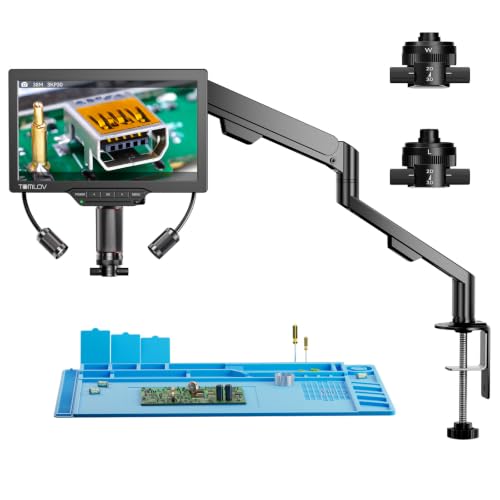
The TOMLOV TM3K-3D is a $199.99 digital microscope built for soldering, electronics inspection, jewelry, coins, and small mechanical parts. Its 7-inch IPS screen shows a 3K image, while the side-viewing design lets you inspect components from different angles. The imaging system can rotate through 360 degrees, which helps reveal solder joints and chip edges that a straight-down camera may miss.
Two magnetic lenses cover different jobs. The L lens leaves more working room for soldering and watch repair, while the W wide-angle lens frames larger items such as coins, insects, and jewelry. Switching lenses requires no tools. A flexible arm stand adjusts the viewing position, and the separate LED gooseneck light lets you aim illumination at the work area instead of relying on a fixed ring. You can view the feed on the built-in screen, a larger HDMI display, or a computer through USB. At this price, the multiple viewing options and angled inspection are the main reasons to consider it.
Pros
- 360-degree side viewing can expose hidden solder joints and component edges.
- Magnetic L and W lenses switch quickly for close work or wider subjects.
- HDMI, USB, and the 7-inch screen support different viewing setups.
Cons
- The 7-inch display may feel cramped for detailed work compared with a larger monitor.
- Two lenses cover different tasks, but switching them adds a step during inspections.
4. TOMLOV TM4K-AF Max 4K Autofocus Microscope

Best for: Bench-top electronics repair
At $359.99, the TOMLOV TM4K-AF Max is a digital microscope for circuit work, watch inspection, coin viewing, and classroom demonstrations. Its camera records 4K video and captures 52MP still images, while the 10.1-inch IPS display shows a 1280 x 800 image. Autofocus combines TOF distance sensing with AI adjustments, reducing the need to refocus by hand.
The stand is built for repair work. Its arm rotates 360 degrees and moves horizontally, while the 13-inch pillar and 4-inch fine-adjustment stand provide useful positioning range. A ring light spreads illumination across the subject. HDMI and USB outputs support a tri-screen setup, and the included 16GB SD card stores photos and videos. A controller handles capture, recording, and zoom without touching the display. The thumbnail, locate function, and eight DIY grid lines also help with soldering alignment.
Pros
- Autofocus uses TOF sensing and AI adjustments for hands-free focusing.
- The rotating arm and adjustable stand suit circuit boards and other bench work.
- HDMI, USB, and a 16GB SD card support viewing and recording.
Cons
- The built-in screen is 1280 x 800, not 4K, so full camera detail requires an external display.
- The advertised 2x to 2000x range includes digital magnification, which may not reveal extra fine detail at the highest setting.
3. Andonstar AD246S-M Digital Microscope

Best for: Hobbyists switching between projects
The Andonstar AD246S-M is a digital microscope for soldering, coin viewing, plant inspection, and prepared slides. At $139.99, it includes three lenses, a metal boom-arm stand, and a 32GB Micro SD card. Lens L covers repair work, Lens A handles larger objects, and Lens D suits biological slides. The stand measures 7 x 7.8 x 13 inches and adjusts front to back, side to side, and by angle.
Its 2160P video recording and HDMI output make it useful for group demonstrations or detailed bench work. The listed magnification reaches 2000x, but that figure depends on Lens D, a 28-inch HDMI display, and 3x digital zoom. On the microscope screen, the lens ranges are lower. Eight LED brightness levels help control lighting, while the remote handles zoom and image changes. The kit also includes five prepared slides, a slide holder, tweezers, an observation box, cables, and measurement software for Windows PCs. Lens changes use screws, then focusing comes from the lens wheel and stand knob.
Pros
- Three lenses cover circuit repair, coins, plants, stones, and slides.
- The metal stand provides adjustable positioning for larger work areas.
- HDMI output, 2160P recording, and a Micro SD card support viewing and storage.
Cons
- The advertised 2000x maximum requires an external 28-inch HDMI monitor and digital zoom, not just the included display setup.
- Changing lenses requires removing and reinstalling screws, and the measurement software works with Windows PCs only.
2. Aikokkl Digital Soldering Microscope

Best for: PCB soldering at a small bench
The Aikokkl 5-inch LCD digital microscope is designed for close inspection of circuit boards, solder joints, and small parts. Its flexible gooseneck arm changes the lens-to-object distance, while a silver focus wheel sharpens the image. Digital magnification reaches up to 1000X, though that figure does not replace true optical magnification. A C-clamp helps attach the stand to a workbench, and the $66.99 price keeps this setup within reach for occasional repairs.
The 5-inch IPS display gives you a larger working view than a phone screen. You can also select PC Camera mode and use Windows Camera or Mac Photo Booth without installing extra drivers. Saving photos and 1080p video requires a Micro SD card, sold separately, with support for cards up to 32GB. The arm fits tight spaces, but the camera is meant for small details, not full-screen views of large objects. The seller also advertises troubleshooting help or a replacement within 12 hours for certain arrival problems.
Pros
- A 5-inch IPS screen provides a clear local view during detailed repairs.
- The flexible arm and C-clamp suit crowded workbenches and uneven objects.
- PC Camera mode works with built-in Windows and Mac apps.
Cons
- Focus requires manual arm adjustment and wheel rotation, so magnification is not automatic.
- A Micro SD card is required for regular photo and 1080p video storage, but it is not included.
1. TOMLOV DM9 Digital Microscope

Best for: Coin collectors and DIY electronics hobbyists
The TOMLOV DM9 is a desktop digital microscope with a built-in 7-inch LCD screen. Its 12MP camera captures photos, while 1080P video supports collection records and project documentation. The included 16GB microSD card stores files without an immediate extra purchase. You can also connect the microscope to a Windows or Mac computer for a larger live view.
Its strongest feature is the stable setup. The 8.5-inch metal stand and heat-resistant metal base provide a firm platform for coins, circuit boards, jewelry, and small mechanical parts. Height adjustment changes the viewing range, and the focus control helps inspect dates, mint marks, scratches, solder joints, and surface textures. Eight built-in LEDs handle general illumination, while two flexible gooseneck lights add side lighting. At $95.99, this is a feature-packed option for close-up work, though the advertised 1200X magnification depends on working distance and focus.
Pros
- A 7-inch screen provides a comfortable view for comparing coins or sharing observations.
- The metal base and 8.5-inch stand offer better stability than a handheld magnifier.
- Photo, 1080P video, PC viewing, and 16GB storage support collection records and repairs.
Cons
- The desktop stand and metal base make it less convenient to carry than a compact handheld microscope.
- The included 16GB card can fill quickly when saving many photos or video files.
Buying Guide
The most important factor is usable working distance. A soldering microscope should leave at least 4 to 6 inches between the lens and circuit board, so tools can move without hitting the objective.
- Working distance: Choose 4 to 8 inches for room to use a soldering iron, tweezers, and flux. A distance below 3 inches feels cramped.
- Magnification range: Look for roughly 3x to 20x optical magnification. Lower power helps locate parts, while 10x to 15x suits tiny pads and component pins.
- Optical system: Stereo optics provide depth perception, which helps with component height and solder placement. Avoid relying on digital zoom alone, since it can blur fine details.
- Lighting: Select an adjustable LED ring light with brightness control. A diffuser helps reduce glare from solder, metal shields, and glossy circuit boards.
- Stand and camera: Use a stable boom stand with at least 12 inches of horizontal reach. A 1080p camera is useful for screen viewing, but it should not replace clear eyepieces.
If you cannot have everything, prioritize working distance, since cramped tool access can make accurate soldering much harder.
Frequently Asked Questions
How much magnification do I need for micro soldering?
A microscope for micro soldering should provide 10x to 20x usable magnification, with enough working distance for a soldering iron. A zoom range around 0.7x to 4.5x at the objective often gives a practical view, while 100 to 200 mm of working distance leaves room for tweezers, flux, and the circuit board.
What type of microscope is best for board-level soldering?
A stereo microscope is usually the best choice for board-level soldering because it provides depth perception and a three-dimensional view. Choose a binocular model for live work, or a trinocular version if you need a camera port. 10x eyepieces with a 0.7x to 4.5x zoom range cover many repair tasks.
Can a digital microscope handle micro soldering repairs?
A digital microscope can handle micro soldering, but it is best for inspection and occasional repairs rather than precise, daily rework. Many models show video on a monitor, yet fixed camera angles, display lag, and limited depth perception can make tip placement harder. A 1080p screen and 10x to 30x displayed magnification may help, but those figures do not equal optical magnification.
Are ring lights useful on a soldering microscope?
Ring lights are useful for general inspection, but adjustable side lighting is usually better for solder joints and component edges. A built-in LED ring can create glare on flux or shiny pads, so look for dimming and a color temperature near 5,000 to 6,500 K. A flexible lamp positioned 30 to 60 mm from the board can reveal shadows and uneven joints.
Conclusion
TOMLOV DM9 Digital Microscope is the top recommendation for repairers who want a straightforward digital view while working on small circuit boards and components. If your priority is depth perception, long bench sessions, or natural inspection through eyepieces, pick a stereo microscope instead, since it can provide a more familiar view and better hand positioning for some detailed repairs. Before buying, double-check the microscope’s footprint, working distance, compatibility with your monitor or computer, included accessories and quantity, plus the current price, because listings and bundles can change. A good choice should match your bench space, viewing preference, and repair workflow, not just the largest number printed on its box.
