What Is Snp_log TXT Android
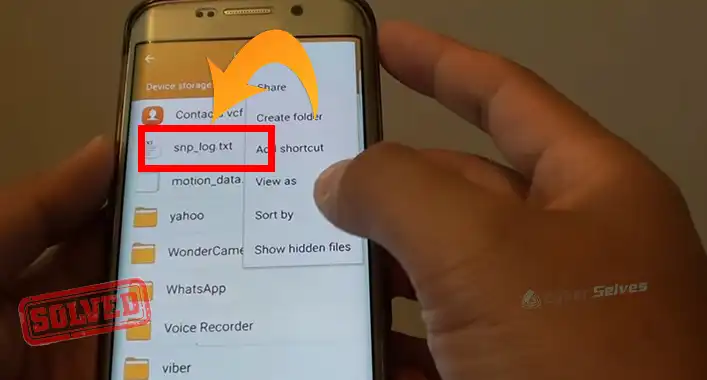
Have you ever come across a file named SNP_Log.txt on your Android phone and wondered what it is and why it’s there? well, simply a TXT log is a file that contains information about the activity on a device.In this article, we will explore more about what SNP_Log.txt is and provide information on TXT files, logs, and how to delete logs on Android devices.
What is a TXT Log?
Logs are used to keep track of events that occur on a device, such as errors or warnings. They can help troubleshoot issues with a device.
SNP_Log.txt is a type of log file that is found on some Android devices. This file is created by the SNP (Sensor Normalization Processor) service, which is responsible for processing sensor data on the device. The SNP_Log.txt file contains information about the sensor data that the SNP service has processed, such as accelerometer and gyroscope data.
What are TXT Files on My Phone?
TXT files are plain text files that can be created and edited using any text editor, such as Notepad or TextEdit. They are used to store information that can be easily read and edited by humans. TXT files can be found on any device, including Android phones.
How to View Android Logs?
Both the command-line tool and the Android Studio Logcat interface are available for viewing log messages. The Google Play store also offers a number of Android apps that make it simple to access these features. The following video refers how to view android logs
How Do You Delete Logs on Android?
Logs are important files that keep track of activities and events on your Android device. They can help diagnose problems, but they can also take up space on your device’s storage, which may affect its performance. In this article, we will elaborate on how to delete logs on Android. The process of deleting logs on Android is relatively simple and can be done in a few easy steps.
1. Using a File Manager App
You can use a file manager app to delete logs on your Android device. A file manager app is an application that allows you to manage the files and folders on your device’s storage.
2. Using a Cleaning App
You can use a cleaning app to delete logs and other unnecessary files on your Android device. Cleaning apps are designed to scan your device’s storage for junk files, cache files, and other unnecessary files that can be safely deleted.
3. Using ADB (Android Debug Bridge)
Advanced users can use ADB, a command-line tool that allows communication between a computer and an Android device, to delete logs.
Frequently Asked Questions
What are Logs on Android?
Logs on Android are files that contain information about the activities and processes that occur on your device. These files are used to track errors, warnings, and other system events. They can help diagnose problems on your device and identify their root causes.
What Distinguishes a .log File from a .TXT File?
Both files are simple text. The distinction is that.txt files are written by the user, such as in a word processor, whereas.log files are often generated automatically, such as by software. One might consider the log file to be a portion of the.txt file. Simply put, a “log file” refers to a text file that holds a log of data.
Does the iPhone Have a Log?
The iPhone and iPad produce logs of various system activities, including app crashes and other data that may be interesting or useful. By linking an Apple device to a Mac, you can access those logs.
If this helped, take a look at Can A Txt File Be a Virus? How Do I Know, Retail Demo Mode Android Malware, Failed To Detect The Bitlocker State For Eds Log Drive.
Conclusion
In conclusion, SNP_Log.txt is a log file created by the SNP service on some Android devices. TXT files are plain text files that can be easily read and edited by humans. Logs are used to keep track of events that occur on a device and can be helpful for troubleshooting issues. If you want to delete logs on your Android device, you can do so by following the steps stated above.